

Importing past course completions
The engagement import brings in course completions from a spreadsheet: training people did in your previous system, or outside Learnient altogether. Each completion is recorded as if it had happened in Learnient on that date, so it counts in compliance, CPD, certificates, skills and reports in the same way.
Importing past completions from a spreadsheet
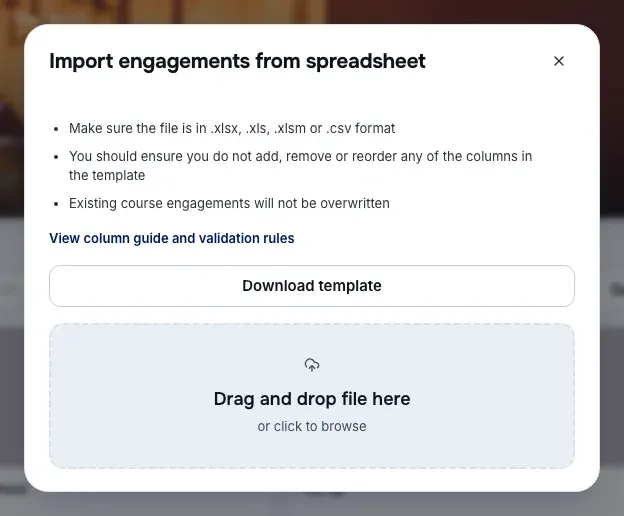
Section titled “Importing past completions from a spreadsheet”- Choose Library in the menu. On the Courses page, choose Import and then Engagement.
- Choose Download template. Keep the columns exactly as they are: don’t add, remove or reorder them.
- Fill in one row per completion. Only course name and the learner are required. Choose View column guide and validation rules for what each column accepts.
- Drag your file onto Drag and drop file here, or click it to choose the file, then choose Import.
- When it finishes, the window gives the count of Records imported, and of any Duplicate records and Invalid records. Choose Download import summary: every row has a remark saying whether it was added, and if not, why.
Which columns the engagement import uses
Section titled “Which columns the engagement import uses”| Column | What to put in it |
|---|---|
| course name | The course’s exact title |
| learner email or name | The learner’s email, or their full name |
| work id | The learner’s works ID. Use it instead of, or as well as, the email or name |
| status | passed (the default), completed, failed, in_progress, enrolled or waitlisted |
| completed on | Required for passed, completed and failed, as yyyy-mm-dd |
| score percent | Their score. Leave it blank if the course wasn’t scored |
| certificate issued | yes, no, or blank to do what the course is set to do |
| certificate expires on | Leave it blank to work it out from the course |
| credited hours | Learning hours for CPD. Leave it blank to use the course’s hours |
| time spent minutes | How long they spent on the course |
| started on, progress percent, points | Optional details of the attempt |
| observed by, observed on | Who observed the learner, and when, if a sign-off came with the completion |
If you give a work ID and an email or name, they have to be the same person. If they aren’t, the row is refused with Error: The work ID and the learner email or name are for different people.
What an imported completion counts towards
Section titled “What an imported completion counts towards”An imported completion is recorded the way a completion in Learnient would have been on that date.
- Certificate. If the course issues certificates, the learner gets one, dated the day they completed. Put no in certificate issued to record the completion without one. If the course has no certificate design, the completion records that a certificate was issued but there’s no file.
- Certificate expiry. With certificate expires on left blank, the expiry is counted from the completion date using the course’s validity period. A completion from two years ago on a course valid for one year shows as expired, as it should. The summary tells you the date it worked out.
- CPD hours. The completion is credited with the course’s learning hours, or the hours you put in credited hours.
- Course version. The completion records the version of the course that was live on that date. If the course later changes enough to need people to take it again, this completion is treated like any other completion of that version.
- Learner’s current record. If the import is the learner’s most recent completion of the course, it also clears overdue on their assignment, advances the skills the course develops (dated the day they completed), and counts towards learning paths that include the course.
Imported completions don’t send notifications, start workflows, award points or badges, or sync to your HR system. They’re a record of something that has already happened.
Importing several completions of the same course
Section titled “Importing several completions of the same course”You can import several completions of one course for the same learner, such as a refresher taken every year. They’re kept in date order whatever order your file lists them in, so the most recent one is the one compliance and reports go by.
A completion older than one the learner already has in Learnient is added to their history before it. The summary says Added to the learner’s history before their later record of this course., and their current record doesn’t change. An imported completion never goes ahead of a course the learner is still part-way through.
Importing the same file twice is safe. A row for a learner who already has that result on that date is skipped with Duplicate: this learner already has this result for the course on that date.
Common questions about importing completions
Section titled “Common questions about importing completions”Does an imported completion use up one of the learner’s attempts?
Section titled “Does an imported completion use up one of the learner’s attempts?”No. If a course limits how many attempts people get, imported completions don’t count towards it. The limit is about attempts in Learnient.
Why does an imported completion show no score?
Section titled “Why does an imported completion show no score?”The score percent cell was blank. A blank score means the completion wasn’t scored, so it’s left out of average scores rather than counted as 0%.
Can I import someone who is still taking a course?
Section titled “Can I import someone who is still taking a course?”Yes. Use in_progress, enrolled or waitlisted with no completion date. This only works for someone with no record of the course yet, because it becomes where they are now.
Why was my row refused with “Course not found”?
Section titled “Why was my row refused with “Course not found”?”The course name has to match the course title exactly. Copy the title from the course rather than retyping it. If two courses share the title, the row is refused because the import can’t tell which you mean.